Daphnis 0.1.0
How it is built
The kernel, the desk and the programs of Daphnis are written in cint, and a small C runtime and a few short assembly stubs remain. One rule runs through all of it: every integer operation is checked, and a result that does not fit stops the program with a fault record.
Checked arithmetic
A whole number in a computer has a fixed size, so it has a largest value, the way a car's odometer has a last reading before it rolls back to zero. In many languages a sum that passes that value wraps around to a wrong number, and the program carries on. In cint every integer operation is checked: add, subtract, multiply, divide, remainder and shift. When the exact result does not fit, the program stops with a fault record that says where and why.
This function turns a count of pages into bytes by multiplying by 4096, and it is called with a count that is too large.
I64 page_bytes(I64 slots) {
    return slots * 4096;
}

I64 bad = page_bytes(4611686018427387904);
"{bad}\n";
The largest value an I64 can hold is 9223372036854775807. The product here is larger, so the program stops at line 2, column 18. A language that wraps would hand back 0 and carry on.
| code | E_OVERFLOW |
| operation | mul.checked.i64 |
| operands | I64 4611686018427387904 and I64 4096 |
| exact result | 18889465931478580854784 |
| limit | I64 9223372036854775807 |
The record gives what was tried, with which values, the exact result and the limit it passed.
The same rule holds everywhere in Daphnis: for a page count in the kernel, a rectangle on the desk and a sum in Calc. The language is specified at integerc.dev/specifications.
Static Linux x86-64 programs run unmodified on the part of the Linux system call set Daphnis implements.
Rights and the AUTH mark
- File permissions follow POSIX, and the kernel's own user gets nothing extra.
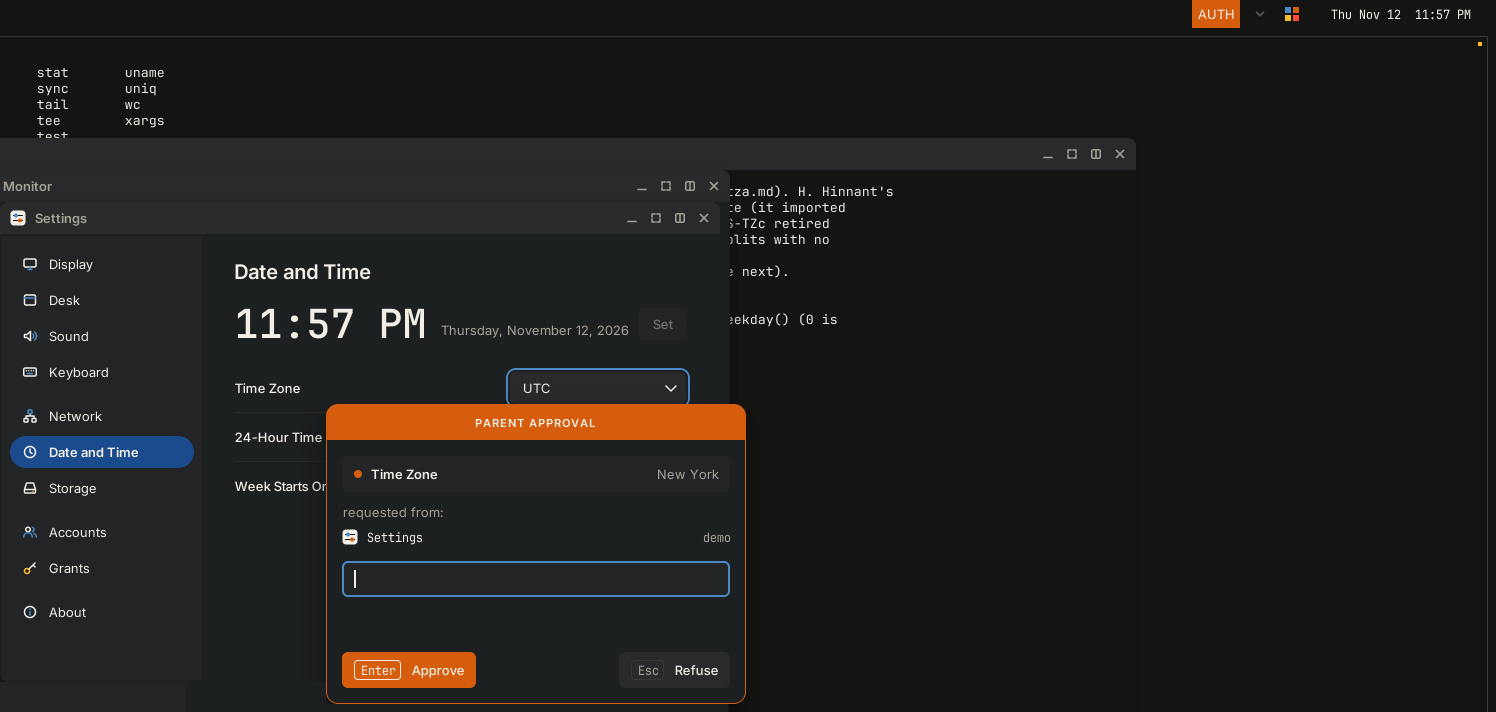
- A program that asks for disk, network, sound or kernel rights beyond its account's raises an approval prompt, and a Parent's password answers it.
- The prompt carries an
AUTHmark that no unauthorized program can replicate. It names the app the desk opened, never a name the program chose. Inside a session, a password box without the mark is not the system's. - In Settings, Grants, Revoke takes a right back from a running window and cuts what it already has open.
- Nothing on the volume is encrypted. Whoever holds the drive can read every file and can try passwords offline.
How it is tested
- Every line of the release notes is tied to a test, and the notes for a release go out only when every line has passed.
- The tests start Daphnis under QEMU and drive the shell, the editors, the desk, the disk, the network and sound.
- Inside a running Daphnis, cint rebuilds itself until the result stops changing. No C compiler is in the image.
- On a computer, the release image is written to a USB drive and started. An account is made, a file is saved and the computer is shut down; after the next start, the file is read back.
Daphnis has started so far on an MSI MPG Z390 Gaming Edge AC (Core i7-8700K) and an HP Laptop 15-da0xxx (Core i5-8250U).
Build it from source
You can build the desk from a checkout of the source and run it under QEMU, on a Linux PC with QEMU and KVM. To run the released image instead, see First run.
- Build the desk and make a volume. The volume is a disk file that holds
/homeand the toolchain, and it keeps your files between runs.B=~/daphnis-work/build-hdesk make FLAVORS=hdesk COMPILERS=gcc O="$B" tools/mkcintvol.sh ~/daphnis-work/scratch.img 256M
- Start the desk. Give every path in full, and point
--outat a new folder outside the checkout.bash tools/desk.sh \ --kernel "$HOME/daphnis-work/build-hdesk/gcc-hdesk/kernel32.elf" \ --initrd "$HOME/daphnis-work/build-hdesk/hdesk/initrd.cpio" \ --volume "$HOME/daphnis-work/scratch.img" \ --out "$HOME/daphnis-work/runs/run-01"
- To stop, tap Super, press the power button at the foot of the plane, and choose Shut Down.
You can add these to the command of step 2.
| option | what it does |
|---|---|
--mode WxH | Sets the screen size, from 640x480 to 3840x2160. Leave it out for 1920x1080. |
--accel tcg | Runs without KVM. Leave it out to use KVM. If your PC cannot use KVM, desk.sh stops with exit status 2 and you add this option yourself. |
--dry-run | Checks everything and prints the QEMU command. It starts nothing and writes nothing. |
desk.sh runs without sudo and leaves your volume as it is. Daphnis gets 4096 MiB of memory, and no network or sound. After each run, receipt.json and serial.log are in the --out folder.
The release image itself, tools/build-release-stick.sh, builds on Debian or Ubuntu only.